

LLM Providers and Connections
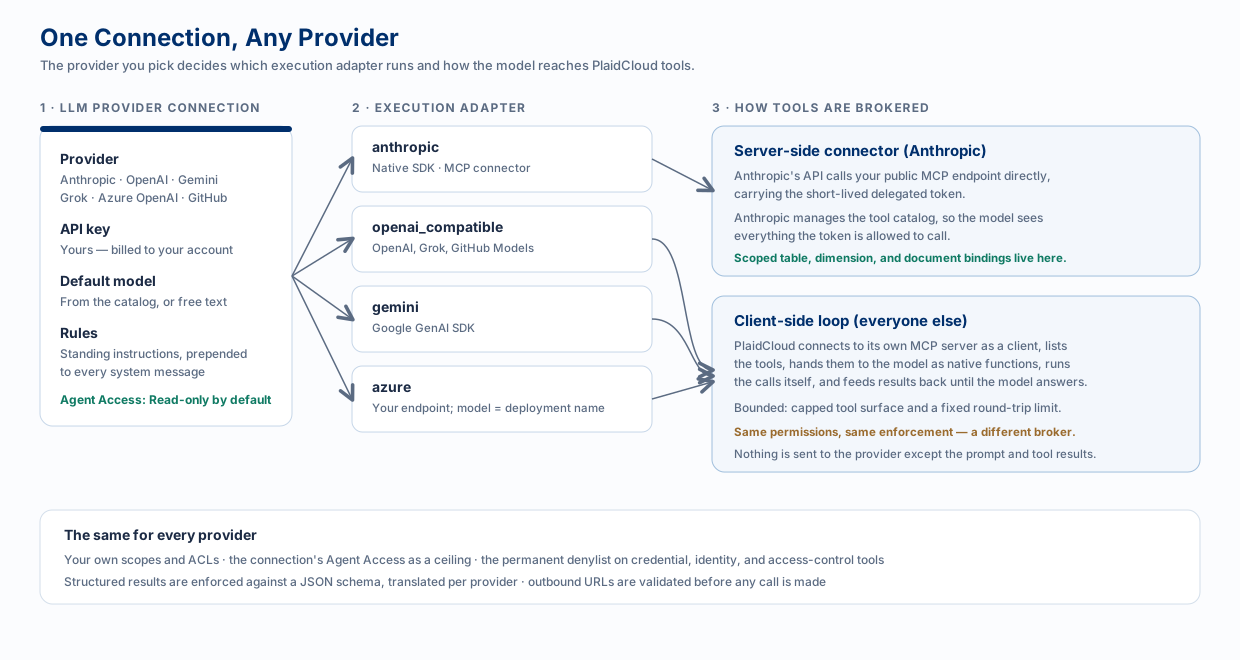
An LLM Provider connection is where you choose the model that powers AI in your workspace. It holds the provider, your API key, a default model, and standing instructions — and it is the point where an administrator decides how much the model is allowed to do.
What the Connection Holds
Section titled “What the Connection Holds”| Field | What it does |
|---|---|
| Provider | Anthropic, OpenAI, Google Gemini, xAI Grok, Azure OpenAI, or GitHub Models. |
| API key | Yours. Usage is billed to your account with that provider, not resold through PlaidCloud. |
| Default model | Picked from a curated catalog, or typed in free-hand so a model released this week still works. |
| Base URL | Filled in per provider. Required for Azure OpenAI (your resource endpoint) and for a self-hosted endpoint. |
| Rules | Standing instructions prepended to every system message — house conventions, tone, what to never do. |
| Agent Access | The ceiling on what agents and steps using this connection may do. Read-only unless raised. |
A workspace can hold several connections; one is marked the default. A workflow step can pin a specific connection when it needs a different model from the workspace default.
Providers and Adapters
Section titled “Providers and Adapters”Six user-facing providers map onto four execution adapters. The adapter decides how the request is shaped and what the model can reach. Provider names below are the labels as they appear in the connection form’s dropdown.
| Provider | Adapter | Notes |
|---|---|---|
| Anthropic (Claude) | anthropic |
The only path with scoped table, dimension, and document bindings. |
| OpenAI (ChatGPT) | openai_compatible |
|
| xAI (Grok) | openai_compatible |
|
| GitHub Models | openai_compatible |
GitHub-hosted models for GitHub-centric teams. |
| Google (Gemini) | gemini |
|
| Azure OpenAI | azure |
Your resource endpoint; the “model” is your deployment name, and the API version comes from the connection. |
How Tools Get Brokered
Section titled “How Tools Get Brokered”An LLM is only useful here if it can call PlaidCloud tools. For the interactive assistant there are two mechanisms, and which one runs depends on the provider. (The unattended LLM workflow step works differently; read that section too.)
Server-Side Connector — Anthropic
Section titled “Server-Side Connector — Anthropic”Anthropic’s API connects to your PlaidCloud MCP endpoint itself, carrying the short-lived delegated token. Anthropic manages the tool catalog on its side, so the model sees everything the token is permitted to call and discovers tools without help.
This is also the only path that supports scoped bindings — see below.
Client-Side Loop — Everyone Else
Section titled “Client-Side Loop — Everyone Else”Other providers have no equivalent connector, so PlaidCloud drives the loop itself: it connects to its own MCP server as a client, lists the tools, hands them to the model as native function definitions, executes the calls the model asks for, feeds the results back, and repeats until the model produces an answer.
Two bounds keep this predictable:
- A capped tool surface. Providers limit how many functions one request may declare, and every schema costs prompt tokens. The exposed set is capped, with the discovery meta-tools always present so the model can still find and invoke anything outside the direct list.
- A fixed round-trip limit. A runaway tool loop stops rather than burning tokens indefinitely.
The LLM Workflow Step Is Different
Section titled “The LLM Workflow Step Is Different”Everything above describes interactive AI. The unattended LLM workflow step does not use the client-side loop at all, and the difference is worth understanding before you pick a provider for one.
| Provider on the step’s connection | What the step can do |
|---|---|
| Anthropic | Reaches your data through the MCP connector, gated to scoped bindings — the specific tables, dimensions, and documents you named on the step, each marked read or write. Anything outside those objects is refused even though the tool exists. |
| Everything else | No data access. The step is a single structured completion: prompt, rules, and schema in; JSON out. |
Two consequences follow directly:
- Bindings are ignored on a non-Anthropic step. They are not silently honored and they are not an error — the step logs that scoped data access is Anthropic-only and runs without them. If you switch a bound step from Anthropic to another provider, it stops reading your data.
- A result schema is required on a non-Anthropic step. With no tools to call, structured output is the only thing the step produces.
Agent Access
Section titled “Agent Access”Every LLM connection carries an Agent Access setting. It is a ceiling, always intersected with the acting person’s real permissions.
| Agent Access | What agents and steps on this connection may do |
|---|---|
| Read-only (default) | List, describe, read table data, read dimension members, read documents, run read-only SQL. |
| Read & write | The above, plus writes the person is already permitted to make — table rows, dimension nodes, document uploads. |
| Full | The person’s complete tool set. |
Above read-only, an unconditional denylist still applies: connection and credential settings, document-account credentials and ACLs, member and group management, password reset, project ACLs, publishing, user-defined function code, and app deployments. Those are never callable by an AI credential at any Agent Access setting.
For an Anthropic workflow step, Agent Access interacts with bindings: write is granted per bound object, so a step can write to the one table you checked and nothing else.
Structured Results
Section titled “Structured Results”When a step declares a result schema, the answer is validated against it rather than parsed out of prose. Because providers express schemas differently, the schema is translated per provider — the strict-JSON dialect for OpenAI-compatible endpoints, the OpenAPI subset for Gemini — and a refusal or a truncated response is surfaced as its own error instead of a confusing “invalid JSON”.
Safeguards Worth Knowing
Section titled “Safeguards Worth Knowing”- Outbound URLs are validated before any call. A base URL must be HTTPS and must resolve to a public address; loopback, private-range, link-local, and cloud metadata addresses are rejected, and redirects are disabled so a response cannot bounce the call somewhere else.
- Keys stay out of logs and errors. Provider errors are scrubbed rather than echoed back with credentials in them.
- Rules are instructions, not permissions. The standing rules on a connection shape how the model behaves. They cannot raise what it is allowed to reach.
Related
Section titled “Related”- AI and LLM Architecture — the surfaces and the shared path
- Using Your Own Controlled LLM — Azure OpenAI and self-hosted options
- Connections — creating and managing connections generally