

Using Your Own Controlled LLM
If your data includes protected health information, personal data, trade secrets, or anything under a contract that names where it may be processed, the question that matters is not which model is smartest. It is whose infrastructure sees the prompt.
PlaidCloud treats the model as a replaceable component so you can answer that question yourself.
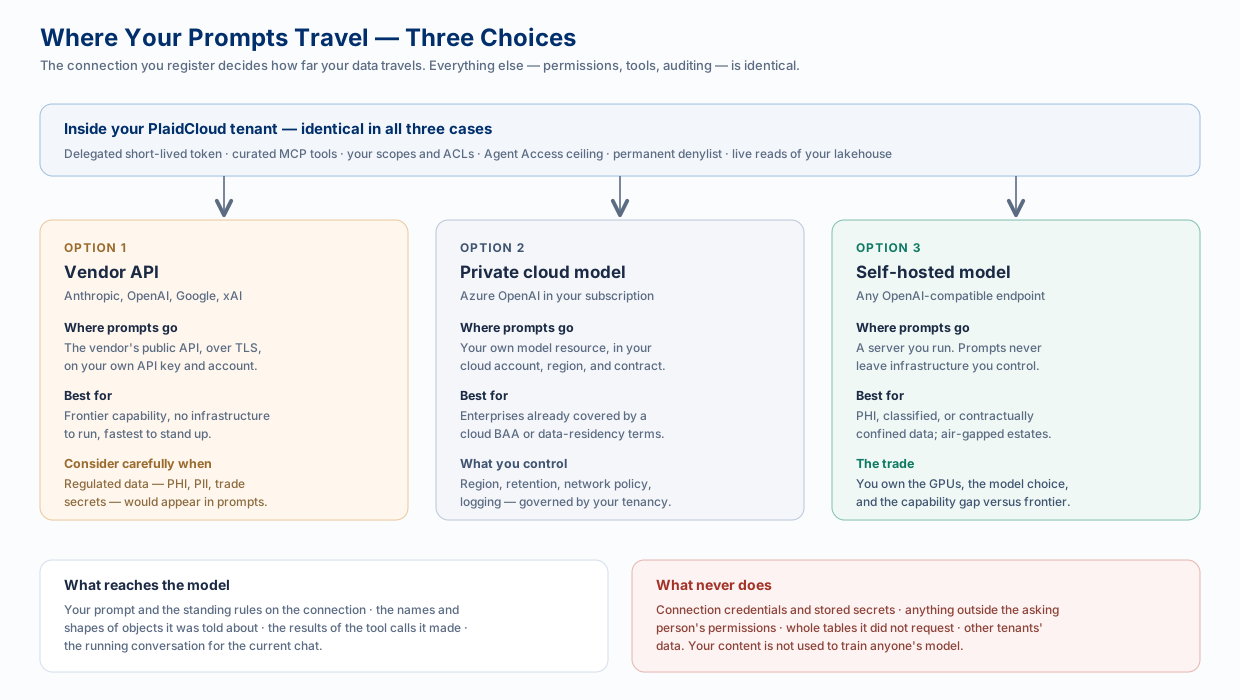
The Three Choices
Section titled “The Three Choices”| Vendor API | Private cloud model | Self-hosted model | |
|---|---|---|---|
| What it is | Anthropic, OpenAI, Google, or xAI’s public API | An Azure OpenAI resource in your own subscription | Any OpenAI-compatible endpoint you run |
| Who sees the prompt | The vendor, under their terms and your account | Your cloud tenancy, under your agreement | Only you |
| Region and retention | The vendor’s | Yours to set | Yours to set |
| Capability | Frontier | Frontier, one step behind the public API | Whatever you can host |
| You operate | Nothing | A cloud resource | Servers and GPUs |
| Fits | General analytics on non-sensitive data | Enterprises already covered by a cloud agreement | PHI, classified, air-gapped, or contractually confined data |
All three are configured the same way: an LLM Provider connection with a provider, a key, a model, and — for the latter two — a base URL pointing at your endpoint.
Why a Controlled Model Is Worth the Trouble
Section titled “Why a Controlled Model Is Worth the Trouble”The prompt is the exposure, and the prompt contains your data. A grounded assistant is useful precisely because real rows reach the model: patient counts by facility, unreleased pricing, a cost structure you would not email out. Everything else in the architecture — permissions, tool gating, short-lived tokens — governs what leaves your systems. Choosing the model governs where it lands.
Pointing PlaidCloud at a model you control means:
- One fewer processor to paper over. No third-party sub-processor to add to a data-protection agreement, a BAA, or a vendor review — because the inference happens somewhere already covered.
- Residency you can prove. “Processed in this region, in this account, under this contract” is an assertion you can evidence, not one you have to take on trust.
- Retention and logging on your terms. You decide whether prompts are retained, for how long, and who can read the logs.
- It survives a policy change. A vendor’s terms can change; infrastructure you operate does not change under you.
- Air-gapped estates get an assistant at all. For networks that cannot reach a public API, a self-hosted model is the only option that exists.
What Actually Reaches the Model
Section titled “What Actually Reaches the Model”Worth being precise, because the answer is narrower than people assume.
Sent to the provider:
- your prompt, and the standing rules on the connection
- the names and shapes of the objects the agent was told about — table and column names, dimension names, bound document paths
- the results of the tool calls the model made, which is to say the rows it asked for and was permitted to receive
- the running conversation for the current chat
Never sent:
- connection credentials, stored secrets, or resolved authorization headers
- anything outside the asking person’s permissions
- whole tables the model did not request
- another tenant’s data
And your content is not used to train anyone’s model.
Which Surfaces You Control the Model For
Section titled “Which Surfaces You Control the Model For”This is the part worth reading twice, because it is not uniform.
| Surface | Whose model runs |
|---|---|
| LLM workflow step | Yours. The step uses the LLM Provider connection you pin or the workspace default. |
| In-app AI Assistant | Yours, via the workspace’s default LLM Provider connection. The multi-agent backend behind some assistant features is set per deployment and can be pointed at a self-hosted model — arrange this with PlaidCloud. |
| AI coding agents | Theirs. Claude Code uses Anthropic; ChatGPT uses OpenAI. PlaidCloud is the data source, not the model host. |
| Microsoft 365 Copilot | Microsoft’s. Copilot runs on Microsoft’s models inside your M365 tenant, under your Microsoft agreement. |
Setting It Up
Section titled “Setting It Up”-
Stand up the endpoint. Create the Azure OpenAI resource and deployment in your subscription, or run your model behind an OpenAI-compatible API.
-
Make it reachable over HTTPS at a resolvable public hostname. Outbound calls are validated before they are made: the base URL must be HTTPS, and a loopback, private-range, link-local, or cloud-metadata address is refused, with redirects disabled. Front a self-hosted model with a TLS gateway on a real hostname and restrict who can reach it at the network layer.
-
Register the connection. Choose the provider, paste the key, set the base URL, and set the model — for Azure OpenAI the model field is your deployment name.
-
Leave Agent Access at Read-only unless a specific job needs more. It is the cheapest control you have.
-
Add your rules. Standing instructions are the right place for house conventions — how to handle identifiers, what never to include in an answer, which caveats to always state.
-
Make it the workspace default, or pin it on the specific workflow steps that handle regulated data.
A Reasonable Middle Ground
Section titled “A Reasonable Middle Ground”Sensitivity is rarely uniform across a workspace, and the model is chosen per connection — so it can be chosen per job. A common arrangement:
- a frontier vendor model as the workspace default, for schema questions, documentation help, expression authoring, and analysis of non-sensitive data
- a controlled model pinned on the workflow steps that touch regulated tables
Same platform, same permissions, same audit trail — two different blast radii, matched to the data.
Related
Section titled “Related”- LLM Providers and Connections — the fields and the adapters
- AI and LLM Architecture — the governed path every surface shares
- Retrieval, Grounding, and Analysis Paths — why your data is never pre-indexed